
Tellers MCP · Now available

Give your AI agent a video editing timeline.

Connect Claude, Codex, and other MCP clients to Tellers. Your agent can create, edit, inspect, preview, and export real video projects through one secure remote MCP server.

REMOTE MCP · STREAMABLE HTTP https://mcp.tellers.ai/ OAuth authentication · Hosted by Tellers

The missing visual layer for agents

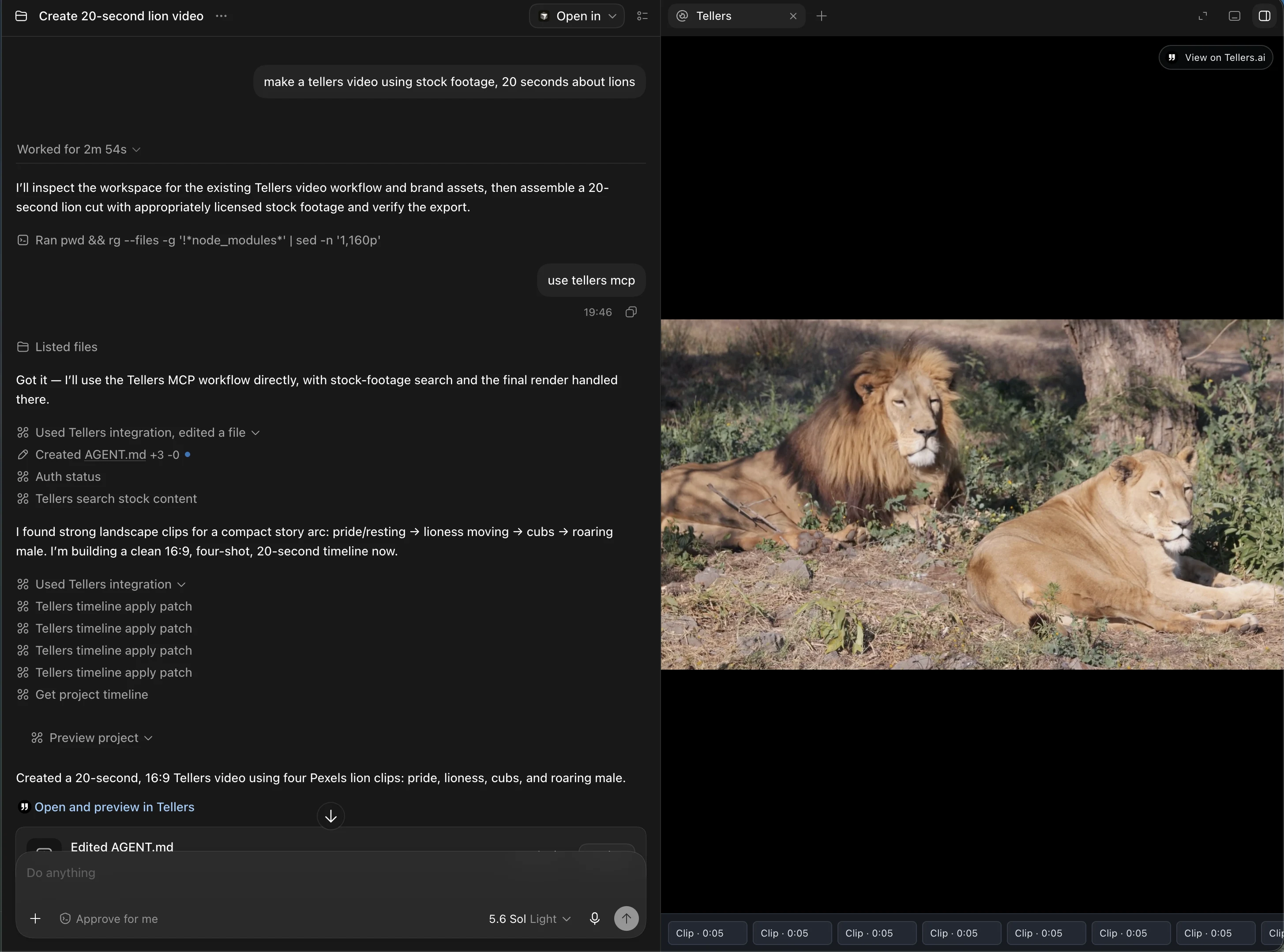
The only MCP that can show a live preview of any video editing timeline as the agent edits it.

Video work should not disappear into a black box. Tellers keeps the timeline visible and playable throughout the agent’s work, so you can review the cut, understand every change, and guide the next edit before export.

01
Screenshot placeholderLive timeline preview while the agent edits · 16:9 recommendedThis page is a work in progress and will be finalised before the official launch on 20 August 2026.

One connection, a complete workflow

From prompt to editable timeline.

  1. 01

    Create

    Turn a brief, script, media library, or raw footage into a structured video project.

  2. 02

    Edit

    Ask your agent to rearrange clips, refine pacing, add media, or iterate on the story.

  3. 03

    Preview

    Open a live, playable preview of the timeline at any point in the conversation.

  4. 04

    Export

    Render and retrieve the finished video without rebuilding the agent’s work elsewhere.

Setup

Connect in a few minutes.

Tellers MCP is hosted remotely and uses OAuth. You do not need to install or maintain a local server.

01

Claude

Connect Tellers to Claude

  1. Open Customize → Connectors in Claude.
  2. Select Add custom connector.
  3. Name it Tellers and enter https://mcp.tellers.ai/.
  4. Select Add, then sign in and approve access when Claude opens the OAuth flow.
  5. Enable Tellers from Connectors in your conversation.

For Team and Enterprise plans, an owner must add the connector for the organization first.

Claude connector documentation ↗
02

Codex

Connect Tellers to Codex

Run these commands in your terminal:

codex mcp add tellers --url https://mcp.tellers.ai/
codex mcp login tellers
  1. Complete the Tellers OAuth flow in your browser.
  2. Run codex mcp list to confirm the connection.
  3. Open Codex and use /mcp to see the Tellers tools.

The same configuration is shared by the Codex CLI and IDE extension on the same host.

Codex MCP documentation ↗

Frequently asked questions

Tellers MCP, explained.

What is the Tellers MCP server?
Tellers MCP is a remote Model Context Protocol server that gives compatible AI agents tools to create, edit, inspect, preview, and export video timelines.
Which AI assistants work with it?
You can connect remote MCP clients including Claude and Codex. The server uses the standard Streamable HTTP transport and OAuth authentication.
Can I see what the agent is editing?
Yes. Tellers is the only MCP able to show a live preview of any video editing timeline as the agent edits it, keeping visual review inside the workflow.

Your next edit can start in a conversation

Connect your agent to Tellers.

Set up Tellers MCP