Want to learn a song on piano, but cannot find a tutorial for the version you love? Or teach a piece without spending hours drawing notes, recording explanations, and editing a lesson? We built an AI music tutorial creator on Tellers to turn a song into a visual lesson from a simple prompt or a music file. It can even generate an original piece on the fly, then show you how to play it.
Watch the Tellers × Mirelo demo above, starting at 0:30, or open it on YouTube.
The same music can become a piano play-along with falling notes, a slow lesson with graphic instructions, or a video led by an avatar teacher. Open the Tellers Music Tutorial Creator and describe what you want to learn or teach.
From “I want to play this song” to a lesson you can follow
Finding the right tutorial is often harder than finding the music. A learner might need only the chorus melody at a slower pace. A teacher might want a clear visual exercise for one student. A musician might have an original recording that has no tutorial at all.
We designed the assistant around that need: take this music and explain how to play it in the format I need.
You choose the instrument, the passage, the learner level, and the presentation. The assistant brings the musical information and video creation together. You can ask for a close view of the instrument with note labels, an instructor who talks through each phrase, or an uninterrupted play-along.
How we built it: Mirelo, MIDI, and tutorial video
The foundation is a connection between recorded sound and visible musical instructions. We use Mirelo’s audio-to-MIDI capabilities in our MIDI-to-video workflow.
An audio recording contains the sound of a performance. MIDI represents musical events: which notes play, when they start, and how long they last. Mirelo’s Audio-to-MIDI technology turns recordings into editable note information, including separate instrument parts from a full mix. That gives the assistant a musical structure to work with when creating the lesson.
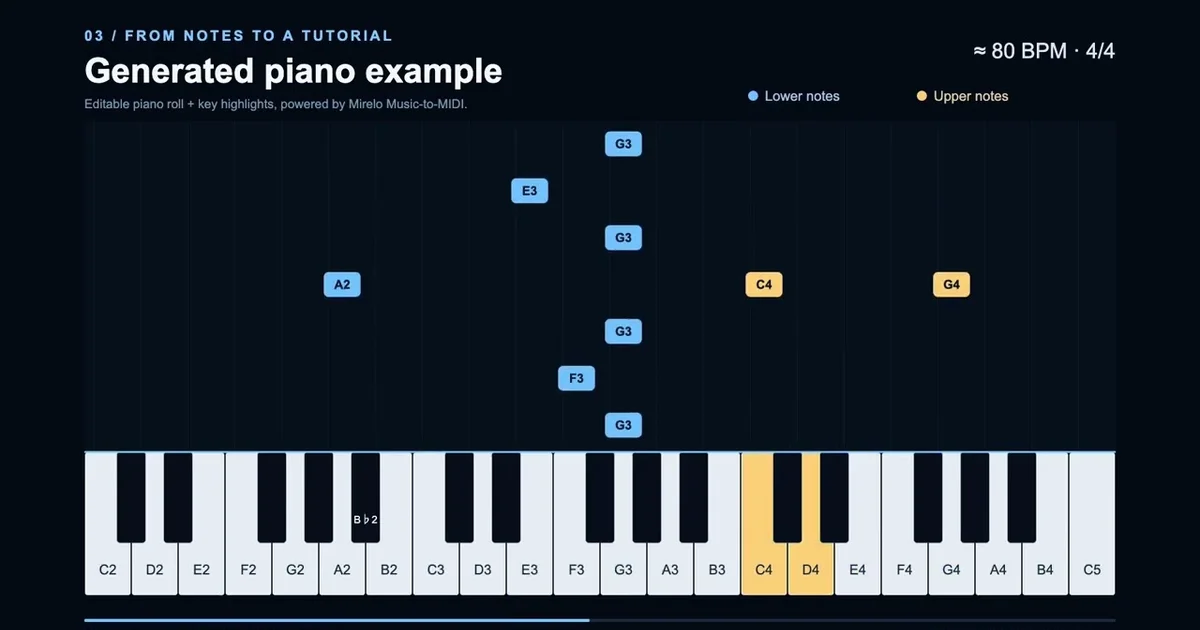
Tellers connects that structure to the video: the instrument view, animated notes, written instructions, and optional avatar teacher. In a falling-notes piano tutorial, note timing determines when a visual note reaches the keyboard. In a step-by-step lesson, the same musical material becomes shorter phrases with explanations and room to practise.
The workflow is song → Mirelo audio-to-MIDI → Tellers tutorial video. When you start with generated music, the assistant creates the piece first, then continues into the lesson workflow.
This lets us build different teaching formats around the same music. The transcription supplies the notes; your prompt supplies the teaching brief. A beginner arrangement and a full performance walkthrough need different instructions, even when they start from the same song.
Choose the music tutorial style that fits your learner
A piano play-along with falling notes
Ask for falling notes above a keyboard, with keys lighting up as each note arrives. This format makes pitch, timing, and note duration visible while the music plays. It is useful when you want to follow the melody at the piano without reading a full score.
For a first lesson, specify a short passage and a slower pace. For practice, request a continuous play-along of the same section.
Turn the chorus of this audio file into a beginner piano tutorial. Show falling notes above the keyboard, highlight the keys, and label the melody notes. Start with a slow demonstration, then play the section through for me to follow.
An avatar teacher who explains the music
An avatar teacher can introduce the lesson, explain what to listen for, and guide the learner between examples. Pair the teacher with instrument visuals so the explanation and the notes appear together.
Create a friendly avatar teacher for this piano lesson. Teach the opening melody one phrase at a time, show the notes on the keyboard, and explain the rhythm in plain language. Leave a practice pause after each phrase.
This format gives music teachers and tutorial creators a way to add spoken guidance to a visual lesson. You can describe the teaching tone and visual style in the same prompt.
Just the instrument, notes, and instructions
You can also keep the screen focused on the instrument. Ask for a clean keyboard view, note labels, and short written instructions, with no presenter.
Make a minimalist piano tutorial from this recording. Show only the keyboard, highlighted notes, and brief instructions. Use large labels and a clear background so the lesson is easy to follow on a phone.
Piano is one example. For another instrument, name the instrument and the part you want taught, then describe the visual guidance the learner needs.
Slow, step-by-step graphic indications
A play-along keeps moving. A beginner may need to stop at each musical idea. Ask for a slower walkthrough with highlighted positions, arrows, note names, and separate practice sections.
Break the first eight bars into short steps. Show which notes to play with clear graphic indications, demonstrate each phrase slowly, and leave time to repeat it before moving on. Finish with a play-along of the whole passage.
You can change the presentation style across these formats: a calm classroom lesson, a colorful beginner guide, or a spare instrument view. Tell the assistant who the lesson is for and what should be visible.
How to create your own AI music tutorial on Tellers
1. Open the specialized music tutorial agent
Start with the Music Tutorial Creator on Tellers. This is the assistant built for turning music into instructional video.
2. Upload a music file or start with a prompt
Give the assistant your recording and describe the part you want to learn. If you do not have a track, ask it to generate one. For example:
Generate a short, gentle piano piece for an absolute beginner. Use a simple melody and a steady rhythm. Then create a slow tutorial that teaches me to play that piece.
This is useful for making original exercises: the music and the tutorial are created in the same conversation.
3. Specify the lesson, not just the look
A useful prompt includes five things: instrument, section, skill level, pace, and tutorial format. “Teach the first verse melody on piano to a beginner, slowly, with falling notes” gives the assistant a much clearer goal than “make a music video.”
If you want an easier arrangement, ask for one explicitly. Showing every part of a full recording on one keyboard may be less useful than teaching a single playable melody.
4. Review and refine the tutorial
Listen to the passage while following the displayed notes. Check that the arrangement and instructions suit the learner, then ask for changes: slow down a phrase, enlarge the labels, add an explanation, or make a separate play-along version.
Audio transcription can need corrections, especially in dense recordings. Reviewing the musical content is part of making a useful lesson.
Who is this music tutorial maker for?
Learners can create a lesson for a specific passage rather than search for a tutorial that happens to match their needs. Music teachers can turn a recording or an original exercise into visual practice material. Tutorial creators can choose an avatar-led lesson, a falling-notes video, or a graphic walkthrough from the same musical starting point.
For educators building a wider lesson series, see how Tellers supports online course creators.
Frequently asked questions
How can I turn a song into a piano tutorial with AI?
Open the Tellers Music Tutorial Creator, upload your music file or describe the music you want to generate, and ask for a piano tutorial. Specify the section, learner level, pace, and visual format, such as falling notes above a keyboard or a slow lesson with highlighted keys.
Can I create a falling-notes piano video from an audio file?
Yes. Tellers uses Mirelo for audio-to-MIDI transcription in its MIDI-to-video workflow. The note and timing information can drive a piano play-along with falling notes and highlighted keys. You can ask for a specific melody or section rather than the entire arrangement.
Can the assistant generate music and then teach me to play it?
Yes. Start with a prompt describing an original piece, then ask the Tellers assistant to turn the generated music into a tutorial. You can request a simple piano exercise, a slow walkthrough, or a play-along version of that same piece.
Can I make a music tutorial with an AI avatar teacher?
Yes. Ask for an avatar teacher to introduce the lesson and explain each phrase alongside the instrument visuals. You can also request only the instrument, notes, and written instructions.
Do I need to know MIDI or use video editing software?
You do not need to prepare a MIDI file or manually animate the lesson to start. Give the Tellers assistant a music file or a prompt and describe the tutorial you want. Listen to the result and check the notes and instructions before using it to teach.
Turn the song you want to play into your next lesson
Start with your music file or a prompt for an original piece. Tell the assistant what to teach, who it is for, and how you want to see it explained.
Create your music tutorial with the Tellers Music Tutorial Creator.