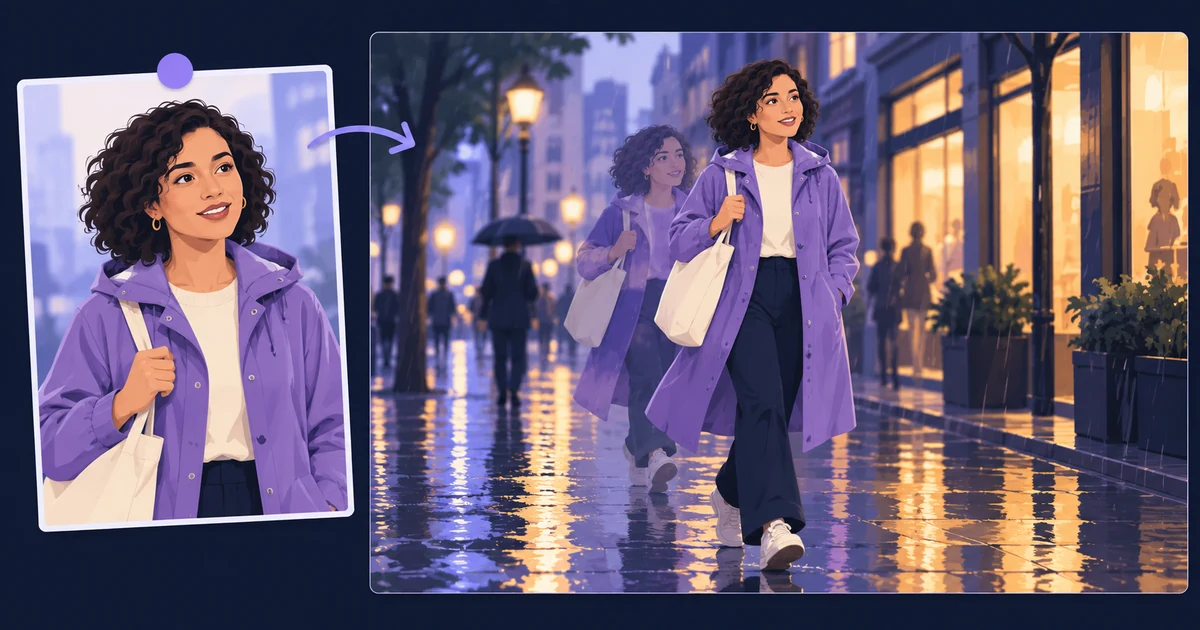
Reference-guided AI video generation gives you more to work with than a written description alone. Pruna’s P-Video-2-Pro-Reference combines visual references with a prompt, helping you carry a character or visual direction into a new shot.
Pruna announced the model in its October 15, 2026 post. P-Video-2-Pro-Reference is available on Tellers. Use image, video and audio references to guide your next shot, then assemble and refine the result on our editable timeline.
P-Video-2-Pro-Reference does not match the output quality of larger models such as Seedance 2.5, but it is faster and cheaper. Use it to explore shots and test visual directions, then switch to Seedance 2.5 when the final result needs a higher level of quality.
What references add
Pruna’s model introduction describes a MiniMax H3-based model designed for image, video and audio guidance. Think of those inputs as different parts of the brief: a picture can establish appearance, a clip can suggest movement, and audio can guide sound.
The current provider documentation requires at least one image or video reference. It documents 5–15-second outputs at 24 fps, with 480p and 768p generation. Higher listed resolutions use an upscale of the 768p result. Speed and Cost modes are available; this Reference model has no Quality mode.
All of these settings are available on Tellers. Tell our agent the duration, resolution and mode you want, and it will handle the generation settings for you.
Give every reference a clear role
For a fictional short film, start with an approved image of the character and one simple action. Adding several unrelated images can leave the model with competing instructions about clothing, lighting or location.
Here is an example brief to adapt in Tellers:
Use P-Video-2-Pro-Reference for a five-second shot.
Use character_raincoat.png for the character's appearance and clothes.
She walks past a warmly lit shop on a rainy evening, carrying the
same canvas bag. One continuous medium-wide shot, gentle camera follow.
Keep her face, purple coat and bag consistent. No dialogue or titles.
Show me one result before generating the next shot.
Review the result for the details that make the character recognisable, especially as she turns or passes an obstruction. Reference conditioning guides generation; it does not guarantee identical details in every frame.
Once the shot works, keep it and change one instruction for the next attempt. If the action is wrong, revise the movement. If the costume drifts, simplify the references before adding more prose.
Audio guidance is not automatically the final soundtrack
Pruna distinguishes ordinary audio references from its keep_audio option, which uses one supplied audio file as the soundtrack and generates video to match it. On Tellers, tell our agent whether the audio should guide the generation or become the final soundtrack. Use the latter when you need to preserve exact dialogue or musical timing.
To build a finished sequence, simply prompt our agent: “Assemble these approved clips on the timeline in this order, and make the audio flow smoothly across the cuts.” The agent handles the edit for you; review the result and ask for changes in the same chat. Our voice-consistency guide explains why a similar voice and a fixed recording are different workflows.
Keep exploration separate from finishing: approve the character and action before requesting more shots or higher-resolution output. Reference usage can also affect the provider’s billing, so ask for the current Tellers token estimate for the complete request rather than relying on a headline output rate.
Try a reference-guided shot in Tellers. Bring a clear reference and one action worth showing.