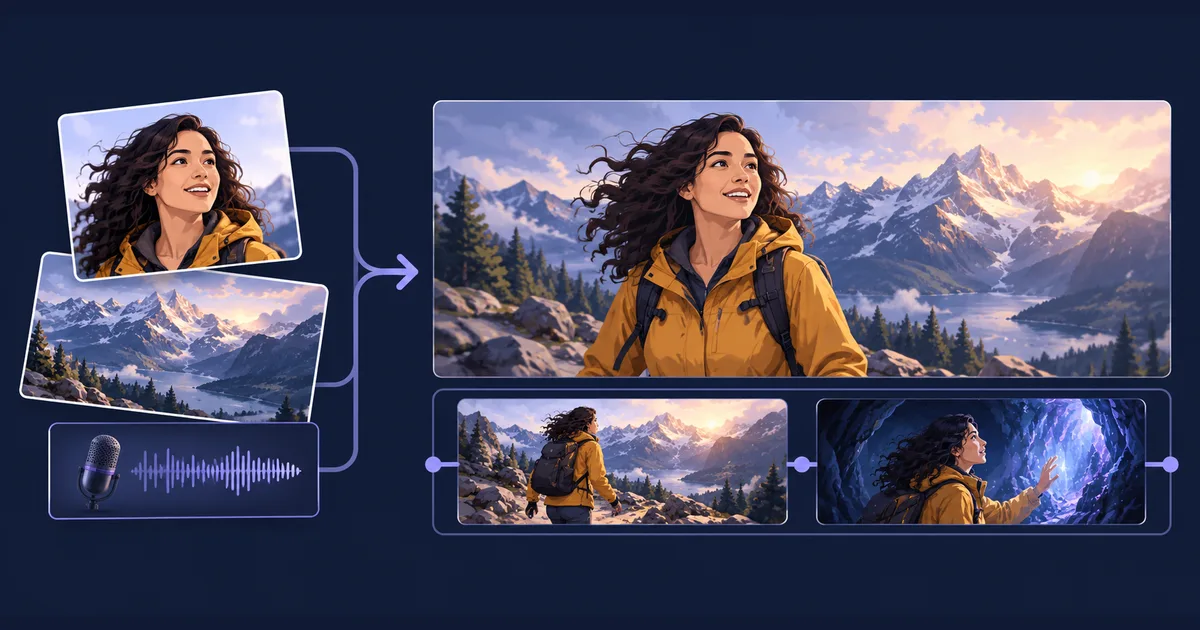
Seedance 2.5 creates video and audio together, using text, images, video clips and audio as direction. For a creator, its most useful capability is being able to explain what each reference contributes: this person, that location, this camera movement, and this voice.
On Tellers, you can ask the editing agent to use Seedance 2.5 for generated footage, then build the finished video around those shots. Music, captions, overlays and cuts remain part of an editable timeline.
What Seedance 2.5 can do
ByteDance introduced Seedance 2.5 on July 31, 2026. Its published capabilities include:
| Capability | What it gives you |
|---|---|
| Up to 30 seconds per generation | Room for a short sequence with a beginning, development and ending. |
| Image, video and audio references | Up to 30 images, 10 video clips and 10 audio clips in one request at the model level. |
| Joint audio and video generation | Dialogue, sound and the visible performance can be generated together. |
| Character and voice references | Reusable direction for appearance and vocal identity across scenes. |
| Extensions | Continue an existing generated sequence. |
| Targeted editing | Direct changes to particular time ranges, subjects, actions or camera perspectives. |
These are model capabilities, not a promise that every interface exposes every control. Ask the Tellers agent to check the available duration, inputs and token estimate for the task you want to run.
Give every reference a job
A folder full of attractive images is less useful than a small set with clear roles. Choose a character image, a setting, and any motion or audio reference you actually need. Name them so the agent can identify them, then describe their purpose.
For example:
Use Seedance 2.5 to create a 12-second adventure scene.

Maya_character.png defines Maya's face, hair and yellow jacket.
Mountain_location.jpg defines the landscape and evening light.
Maya_voice.wav is a voice reference for Maya, not the soundtrack.

Open on Maya walking along the mountain path. Track beside her,
then move closer as she notices a light inside the cave.
She stops and says, "Someone has been here before us."
Generate that line in a voice similar to Maya_voice.wav.

Keep the same face and clothing throughout. No background music.
Add the result to an editable timeline in Tellers.
The filenames make the brief readable; the agent must also attach the corresponding files to the generation. Keep those assignments stable when you ask for another shot. Changing both the character reference and the voice sample makes continuity harder to judge.
Voice references and finished audio are different inputs
Use a voice reference when you want new dialogue with a similar vocal identity. The recording describes how the character sounds; it does not necessarily become the sound you hear in the result.
Use an approved soundtrack when you already have the performance you want. A Suno chorus, a recorded conversation or carefully timed narration should remain the foundation of the edit. Tell the agent to generate the picture around that performance and preserve the original audio on the timeline.
For a music video, make the distinction explicit:
Use the supplied chorus as the final soundtrack.
Create a performance by the character in singer_portrait.png.
The singer should follow the supplied vocal timing.
Do not write new lyrics or replace the song with generated music.
Keep the original chorus audio on the final timeline.
Check the mouth movement against the actual words before producing more scenes. For a recurring speaker, our voice consistency guide explains when to use a reference, compose the dialogue first or reuse a supported voice ID. For songs, see how to turn Suno music into an editable music video.
Plan the shot, then refine the edit
Describe a manageable sequence rather than packing every idea into one prompt. A useful 15-second brief might be: establish the room, follow the performer toward the microphone, then finish on a close-up as the chorus starts. Give the model a clear subject and a reason for each camera change.
After generation, distinguish between a change to the footage and a change to the edit. A different facial performance or a new environment needs generative work. A tighter cut, lyric animation, zoom or color adjustment can often be handled on the Tellers timeline.
For a generative revision, identify the affected interval and preserve the successful parts:
In the middle shot, keep the performer and room but make the camera movement slower. Preserve the opening and ending. Show the token estimate before generating the revision.
For an editing revision, be equally concrete:
Keep the generated shots. Start the close-up on the first chorus beat, shorten the preceding wide shot, and animate the lyric line above the performer’s shoulder.
That separation makes it easier to improve a video without repeatedly regenerating footage you already like.
Where to spend your attention
Inspect faces and voices across cuts, lip-sync, hands, interacting subjects and contact with objects. ByteDance identifies complex motion and interactions between multiple subjects as areas that still need improvement. A convincing first frame does not establish that the whole shot works.
For a demanding scene, approve a short sample before committing to a longer sequence. Keep exact text such as titles and lyrics in editable overlays, where you can correct the wording and timing directly.
Open Tellers, add your references, and describe the final video you want. Seedance 2.5 can supply the generated performance; Tellers brings the footage, sound and finishing work together in an edit you can keep changing.
Frequently asked questions
What can Seedance 2.5 generate?
Seedance 2.5 generates video and audio together from a text brief, with image, video and audio references. ByteDance documents clips up to 30 seconds, extensions and targeted editing. Available settings depend on the integration you use.
Can Seedance 2.5 keep the same character and voice?
It supports references for character appearance and voice. Reuse the same assets and explicitly assign each reference to its character. Review continuity across shots: references guide generation, but do not guarantee an identical performance every time.
Is an audio reference the same as a soundtrack?
No. A voice reference guides a newly generated voice. A soundtrack supplies the words, performance and timing the video should follow. State which role the audio should play, use a compatible generation workflow, and keep your approved audio on the editing timeline.