Build with Tellers
Your app. A live video.
One iframe.
Let users watch their video take shape inside your product. Embed the same player used by Tellers Skills, add a fully editable timeline when they want more control, and let them export or send the finished MP4 into your app.
- 01 / REQUEST“Make me a video.”Your user asks in your app.
- 02 / CREATEYour app calls Tellers.Your agent builds the edit.
- 03 / WATCH & EDITThe video takes shape.Preview live. Fine-tune if needed.
- 04 / USEGet the MP4.Download it or continue your workflow.
Choose how much control to show
Player only
A focused preview with playback, scrubbing and export. Keep the conversation in your own interface.
?otio=timeline.otioPlayer + timeline
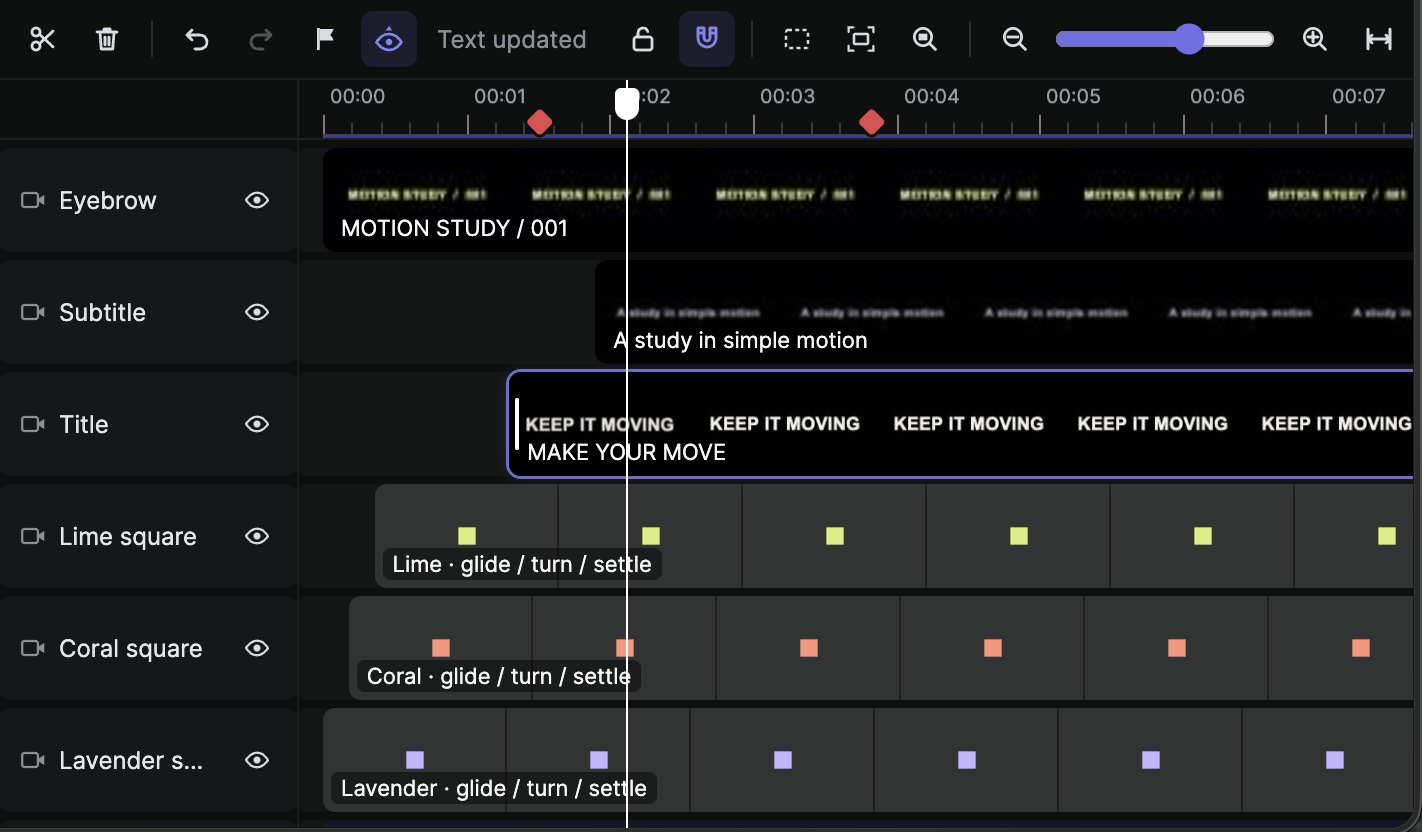
Let users trim, split and move clips, edit text and effects, and leave markers for the agent.
&timeline=1Illustrations of the two layouts. Both use the same timeline and export path.
See the actual editable timeline
1. Add the iframe
Start with the skill’s ready-made player.html. It loads the player bundle from https://tellers.ai/videoplayer/bundle.js. Serve the wrapper alongside your app; the iframe URL below is your copy of that file, not a hosted Tellers embed endpoint.
# From a checkout of github.com/tellers-ai/skills
mkdir -p demo
cp plugins/video-player/skills/video-player/assets/player.html demo/
# Add your timeline.otio and its media to demo/, then:
python3 plugins/video-player/skills/video-player/scripts/serve.py demo --port 8000
Save your app page as demo/index.html and open http://localhost:8000/. Put this iframe in it:
<iframe
  id="tellers"
  src="/player.html?otio=timeline.otio"
  title="Video preview"
  allow="fullscreen"
  style="width:100%; height:480px; border:0"
></iframe>

<!-- Player + editable timeline: use this src and a taller frame -->
<!-- src="/player.html?otio=timeline.otio&timeline=1" height:720px -->
Add &timeline=1 for editing, or &timeline=view for a timeline that only supports inspection and seeking. Reserve about 240px extra height for the timeline.
2. Show the video as it is constructed
When a user requests a video, your backend calls the Tellers API or your agent uses Tellers MCP. As clips, titles and audio become available, supply a player-ready OTIO timeline and refresh the existing preview. The player renders the edit directly, so each update does not require a new MP4.
// Run in your app, after the iframe's player has initialized.
const frame = document.getElementById("tellers");
const ui = frame.contentWindow.ui;
if (!ui) throw new Error("The player is still loading. Try again shortly.");

// Your backend writes the latest timeline, then notifies your app.
// Use this after each completed edit, not only at the end of generation.
await ui.loadUrl("timeline.otio");

// Or pass a complete, player-ready OTIO object:
// await ui.load(latestTimeline);
Your app connects generation progress to these updates; embedding an iframe alone does not subscribe to a Tellers project. Send a complete valid timeline after each edit, with playable media URLs. Keep API keys on your backend. Serve remote media with CORS and range-request support, and refresh signed URLs when they expire.
Keep the user's edits in the loop
The skill wrapper saves manual edits to exports/timeline.otio through its local server. Before the agent updates the edit, wait for frame.contentWindow.timelineStatus.state to be "saved", read that latest file and preserve the user's changes. If saving fails, resolve it before loading another timeline. In production, replace the wrapper’s local save handler with your app’s authenticated timeline persistence.
3. Choose where the finished video goes
Export → Download
The user clicks Export in the player and saves the finished video to their device.
Use this video → Your workflow
Your button triggers the export. Receive an MP4 file, upload it to your backend, then store, publish or process it.
For the app-controlled path, add <button id="use-video">Use this video</button> and <p id="export-status" role="status"></p> to your parent page, then attach this handler. Enable export once the preview is loaded and generation is complete; avoid timeline changes during export.
// Wire this to your app's "Use this video" button.
const button = document.getElementById("use-video");
const status = document.getElementById("export-status");
button.addEventListener("click", async () => {
  button.disabled = true;
  let objectUrl;
  try {
    const ui = document.getElementById("tellers").contentWindow.ui;
    if (!ui) throw new Error("Player is still loading");
    status.textContent = "Exporting… Keep this tab open.";
    const result = await ui.export({
      format: "mp4", resolution: 1080, save: "none"
    });
    objectUrl = result.url;
    const video = await (await fetch(objectUrl)).blob();
    const file = new File([video], "video.mp4", { type: "video/mp4" });

    // Your own authenticated upload endpoint, implemented by your app.
    const body = new FormData();
    body.append("video", file);
    const response = await fetch("/api/videos", { method: "POST", body });
    if (!response.ok) throw new Error("Video upload failed");
    status.textContent = "Video received. Ready for your workflow.";
  } catch (error) {
    status.textContent = error.message;
  } finally {
    if (objectUrl) URL.revokeObjectURL(objectUrl);
    button.disabled = false;
  }
});
/api/videos is an example endpoint in your app, not a Tellers API route. Implement it to accept the uploaded file and pass it to your own processes. The export result is a browser blob URL: upload its bytes, not the URL, to your backend.
For a local agent workflow, the supplied wrapper also exposes exportToFolder("video.mp4", { resolution: 1080 }). Watch window.exportStatus until it reports done or error; the local server writes the MP4 to exports/video.mp4.
Start with the working pieces
Get Tellers Skills → · Player integration reference → · Call the Tellers API →