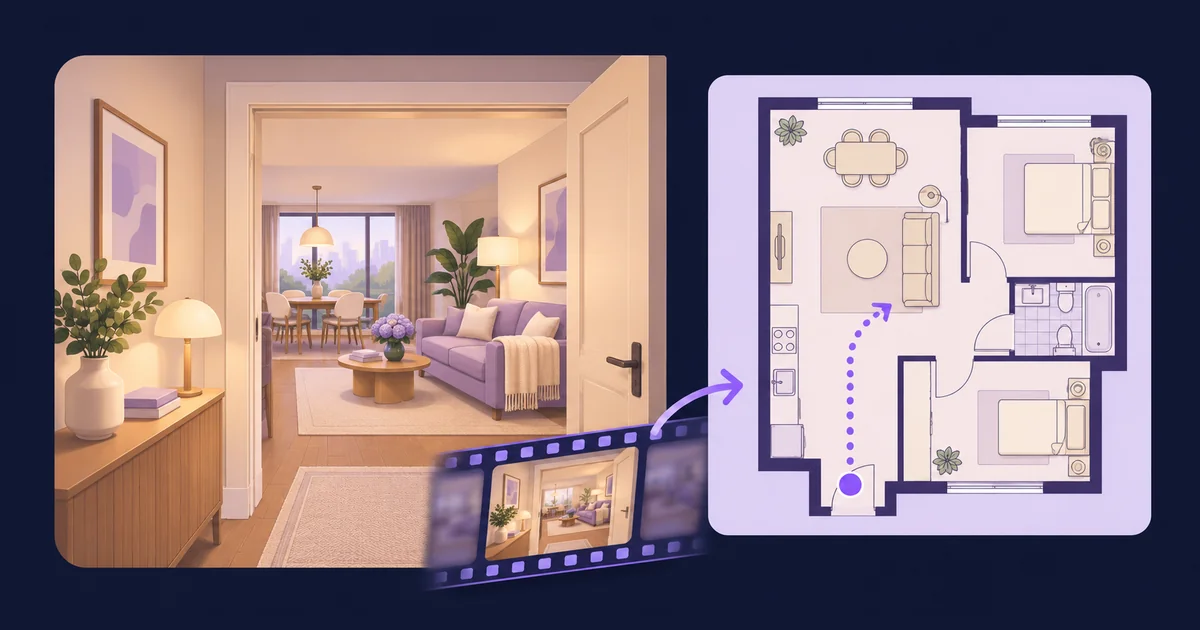
Add a floor plan where the listing video needs to explain how rooms connect. Show the plan just before a confusing turn, or briefly overlay it while the camera moves between two rooms. In Tellers, upload the approved plan as an image alongside the footage, then ask our editing agent to place it in an editable cut.
A kitchen, a dining room and a terrace can all look great in isolation. What a buyer wants to know is whether the terrace opens off the dining room or whether they need to go through the kitchen to reach it. The plan and the footage should answer that together.
Match the plan to the route you actually filmed
Start with the current listing plan. If it comes as a PDF, export the page you need as a high-resolution image. For a multi-level property, name each file by floor and confirm the stairs or lift shown in your footage. Keep room names and dimensions from the approved listing material. If a door or wall differs from the footage, resolve the discrepancy before using the plan.
Identify two or three points where the relationship matters. For a one-bedroom flat, that might be the entrance into the living area, the living area opening to the terrace, and the bedroom off the hall. Write down the source clip or timestamp for each. Look for a moment where the camera can see through the doorway, or a matching shot from the other side. If you never filmed the connection, show the rooms separately and use the plan to explain it; don’t present the cut as a continuous walk.
Keep the map facing the same way throughout. A plan that spins to follow every camera turn can be harder to read than one that stays still. Name the room beside the plan or use a simple dot for the location you have verified. Save precise dimensions for a full-size plan the buyer can open separately.
Choose a card or an overlay
Use a full-screen card when the viewer needs to read several labels or understand an unusual layout. Show the whole plan briefly, then cut to the corresponding wide shot. For a small overlay, show only enough of the plan to explain the move without hiding the doorway in the video. In a vertical Reel, a short card is often clearer than a miniature map sitting behind captions or social controls.
Try this brief in Tellers with the names of your own files:
Create an editable 9:16 walkthrough using the uploaded footage
and approved plan image. Open on the living area, then show how
it connects to the terrace. Use the terrace doorway shot at
[clip and source time] to show the connection.

Just before that shot, show the plan as a short full-width card.
Add Living area and Terrace as separate text labels. Keep the
plan's orientation and geometry. Use only supplied listing facts
and footage. If the images disagree with the plan, flag the
location before adding a label. Keep the rest of the tour moving.
Check the export as a first-time viewer
Watch on a phone. Can you tell where the terrace opens from without stopping to study the plan? If the overlay hides the relevant door, move it or use a card. If you can only read a label by pinching to zoom, shorten the label or let the plan fill more of the frame.
That’s a useful vibe editing revision: “Move the plan card before the terrace cut and hold it until both labels are readable.” For your next listing, keep the same editing brief and replace the files, route and verified room relationships. Our real estate video guide covers the rest of the listing workflow.
Open Tellers with an approved floor plan and one section of your walkthrough that would benefit from it.
Frequently asked questions
Should I show the floor plan at the start or end of a property video?
Show it before or during a part of the walkthrough that needs explanation. A full-screen card can introduce an unusual layout. A small overlay works for one short move between rooms, and an end card is useful as a recap.
Can I add a floor plan to a vertical real estate Reel?
Yes. A full-width card or a crop of the relevant part of the plan is often clearer than a small corner overlay. Keep the orientation consistent and check the export on a phone.
Can I use a PDF floor plan?
Export the approved page as a high-resolution image before adding it to the video. For a listing with several floors, give each image a clear filename and show the level in the edit.