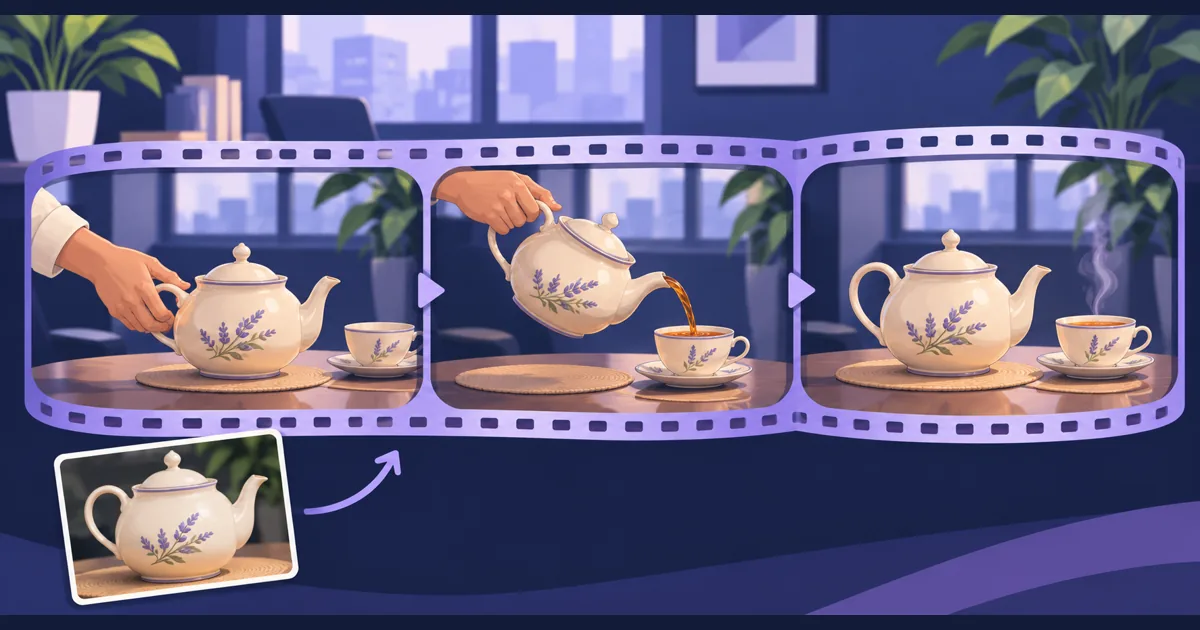
Gemini Omni 1.2 Flash is available on Tellers, with video generation and editing for clips up to 15 seconds. The extra room is useful for a complete action: placing an object, demonstrating it and settling into an ending you can cut from.
Google announced the model on November 5, 2026. The update extends the previous ten-second limit, adds stronger reference following and supports refining clips through multi-turn conversation. Our Omni tool accepts text, images, first and last frames, and image or video references, with audio generation.
Give the longer clip a beginning and an ending
Our recommendation is to spend the extra duration on a readable action, rather than packing more unrelated ideas into a shot. For a ceramic shop, a quiet tea-pouring scene can communicate texture, scale and everyday use without a rapid succession of camera moves.
Prepare a clear product photograph, then describe the action and the details that must remain stable:
Use Gemini Omni 1.2 Flash and the supplied teapot photograph
for a 15-second landscape product scene.

A hand places the cream teapot beside a matching cup, pours tea,
and returns it to the table. Finish with a calm hold on both objects.
Use a steady medium close-up with soft window light.
Preserve the teapot's silhouette, handle, spout and painted decoration.
No dialogue, music, added logos or text.
The closing hold gives you room for an end card or a clean cut to another shot. If only the pour matters, request a shorter duration instead. A maximum length is a creative option, not a target for every generation.
Revise the scene with a focused follow-up
Google describes conversational changes to elements such as lighting and backgrounds. In Tellers, direct the revision by naming both the change and what you want preserved:
Make the background a plain warm-grey wall. Keep the product,
framing, pouring action and soft window light unchanged.
Do not introduce new props. Keep the ending still enough for a title.
Review the whole result after each revision. For this example, follow the handle and spout through the hand movement, watch where the liquid meets the cup, and compare the painted decoration with your source image. A convincing opening frame does not establish that the rest of the action is usable.
Google still identifies complex physics and fast action as areas for improvement. Keep product demonstrations focused, and use real footage when exact physical behaviour is essential to the claim you are making.
Assemble the finished video by prompting
Once the generated scene works, ask our agent to place it on an editable timeline with your other approved material:
Build a 20-second product video using this approved tea scene
and my supplied opening close-up. Trim redundant pauses, keep
the pouring action complete, and add my exact product name at the end.
Review sound across the cut. Show the playable timeline before export.
Keep important written information in editable titles so you can check spelling and revise it independently of the generated image. Our reference-guided video guide covers another model-based approach to directing scenes from supplied assets.
Open Tellers to generate the scene, revise it and assemble the final video by prompting.
Frequently asked questions
Is Gemini Omni 1.2 Flash available on Tellers?
Yes. Our Omni generation tool supports the model for video generation and editing, including clips from 3 to 15 seconds with audio and reference inputs.
Should every generated shot use the full 15 seconds?
No. Choose enough time for the action to read clearly. A longer generation is useful when the beginning, action and ending belong together; trim unused time when assembling the final edit.