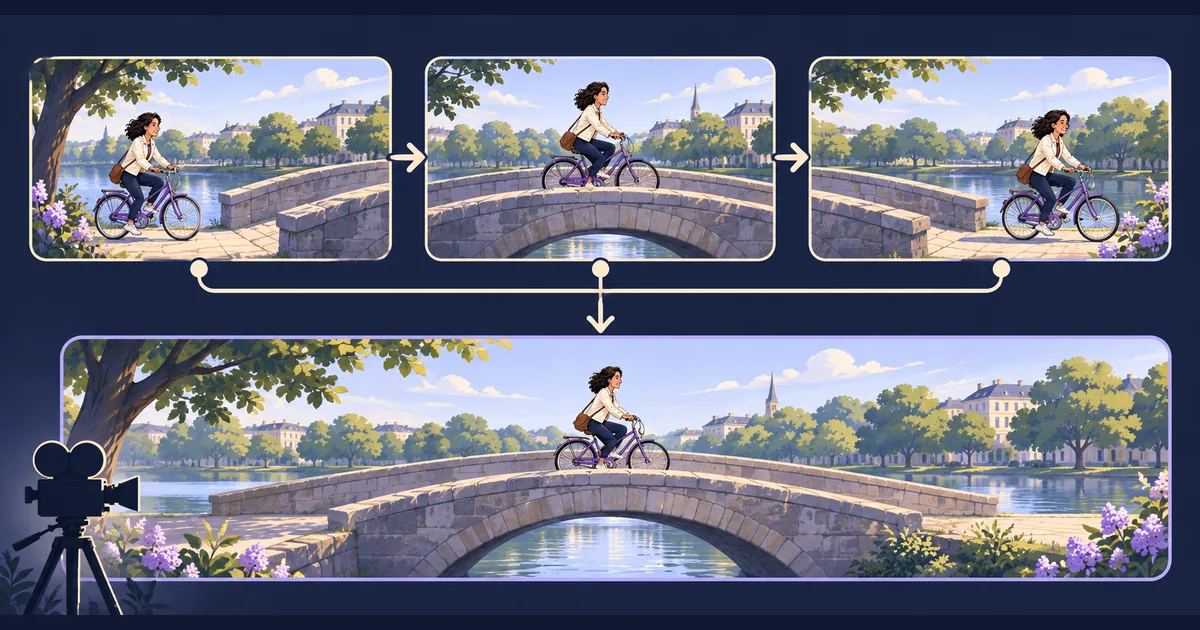
Kling 4.0 is available on Tellers with sound, clips up to 30 seconds and intermediate keyframes. We added it in our November 11 update. For creators, the useful change is being able to plan what happens between a shot’s opening and ending, rather than leaving the entire middle to a text description.
The model itself launched on October 15, according to Kuaishou’s announcement. This week’s news is its arrival in our editing workflow: generate the shot, review it and ask Tellers to work it into your video.
Give the middle of the shot a purpose
A first frame establishes the opening composition. An intermediate keyframe gives the model another visual moment to work toward. The final frame defines where the sequence should arrive. Kling’s keyframe guide describes these images as milestones, with the model generating the movement between them.
Consider an illustrated cycling promo: a rider approaches a stone bridge, crosses its centre and reaches the far bank. Three coherent images can describe that progression more clearly than one image plus a long paragraph of competing instructions.
Prepare the images with the same rider, bicycle, clothing, light and travel direction. Use the middle frame for the moment that matters, such as the bicycle reaching the bridge’s crest. Avoid introducing an unexplained costume change or a new landscape halfway through.
Keyframes and reference images have different jobs. A photo of the bicycle can guide its appearance without becoming a particular moment in the shot. A keyframe showing that bicycle on the bridge sets a visual milestone in the action. First and last frames are the two endpoint keyframes; Kling 4.0 also accepts up to eight intermediate frames on Tellers. Its separate reference-image input accepts up to ten images for characters, objects or style. See our keyframes vs reference images and first/last frames guide for model limits and examples of choosing the right input.
Can we define precise timestamps for Kling keyframes?
Timing has to be given in the Kling prompt, and it is not precisely respected. There is no separate precise timestamp-placement control for middle frames on Tellers. You can write fractional targets—the official middle-frame example includes them—but that does not make them reliable timing constraints.
In our Tellers Movement Anchoring experiment, Robin tested five sampling patterns, explicit timestamp instructions, @image1 references and labels such as “middle frame 1”. None produced the reliable placement needed for the method. Kling often used the last middle image as the generated ending and added intervening movement. Keyframes remain useful visual guidance; do not plan an exact overlap or timed handoff around them.
Source-frame extraction is separate: Tellers can extract individual frames precisely. The failure was in Kling’s generated timing, not the extraction. Clip-duration and image-count limits still apply.
Found a way to make Kling follow middle-frame timing more precisely? Send a reproducible prompt, settings and result to contact@tellers.ai.
Generate one continuous action in Tellers
Upload your keyframe images and name their roles. Then ask for our Kling generation tool:
Use Kling 4.0 to create a 30-second illustrated cycling shot.
Use bridge_approach as the first frame, bridge_centre as an
intermediate keyframe, and far_bank as the final frame.

The rider travels left to right at a relaxed, consistent pace.
Follow with a smooth lateral camera movement. Keep the same
cream jacket, purple bicycle and afternoon light throughout.
Make this one continuous take with no scene changes.
Include gentle outdoor ambience, with no dialogue or music.
Choose a shorter duration when the action needs less time. More seconds create more movement to direct and review; they do not automatically make the shot more useful. A clear entrance, progression and exit are a better brief than “make it cinematic.”
Review motion, then build the edit
Keyframes guide generation; they do not replace watching the result. Follow the wheels, hands and contact with the ground. Look for changes in bicycle geometry, an abrupt speed shift or a camera move that hides the intended action. Listen to the generated ambience as well as watching the picture.
If the result misses the brief, identify the moment that failed and revise that instruction or reference. Avoid changing the subject, camera and pacing together when only one needs attention.
For a real product campaign, use recorded footage where the viewer needs to judge the actual product. A generated bicycle sequence can establish a mood, but it should not stand in for evidence of how a particular bicycle handles or performs.
Once the shot works, ask Tellers to place it in your sequence, trim it to the needed action and add your own end card. Put exact campaign wording in the edit rather than asking the generated scene to carry it. Start a Kling 4.0 shot in Tellers with a small set of images that agree on what should happen.
Frequently asked questions
Can we define precise timestamps for Kling keyframes?
Target times must be given in the Kling prompt; there is no separate precise placement control for middle frames on Tellers. Fractional times can be requested, but Kling did not respect them precisely in our Movement Anchoring tests. It often treated the last middle image as the generated ending and added intervening movement. Precise source-frame extraction does not make generated timing precise.
Do I need to generate a full 30-second clip?
No. Treat 30 seconds as the maximum, not a target. Choose a duration that gives the action enough room without adding empty time.
Are generation keyframes the same as timeline cuts?
No. Here, keyframe images guide visual moments inside a generated clip. Timeline cuts determine how that clip fits with your other footage, titles and sound in the finished video.
What is the difference between keyframes and reference images in Kling 4.0?
Keyframes guide visual moments in order: the opening, intermediate stages and ending. Reference images guide a character, object or visual style without assigning that image a position in the sequence. On Tellers, Kling 4.0 accepts a first frame, up to eight intermediate frames and a last frame, with a separate input for up to ten reference images.