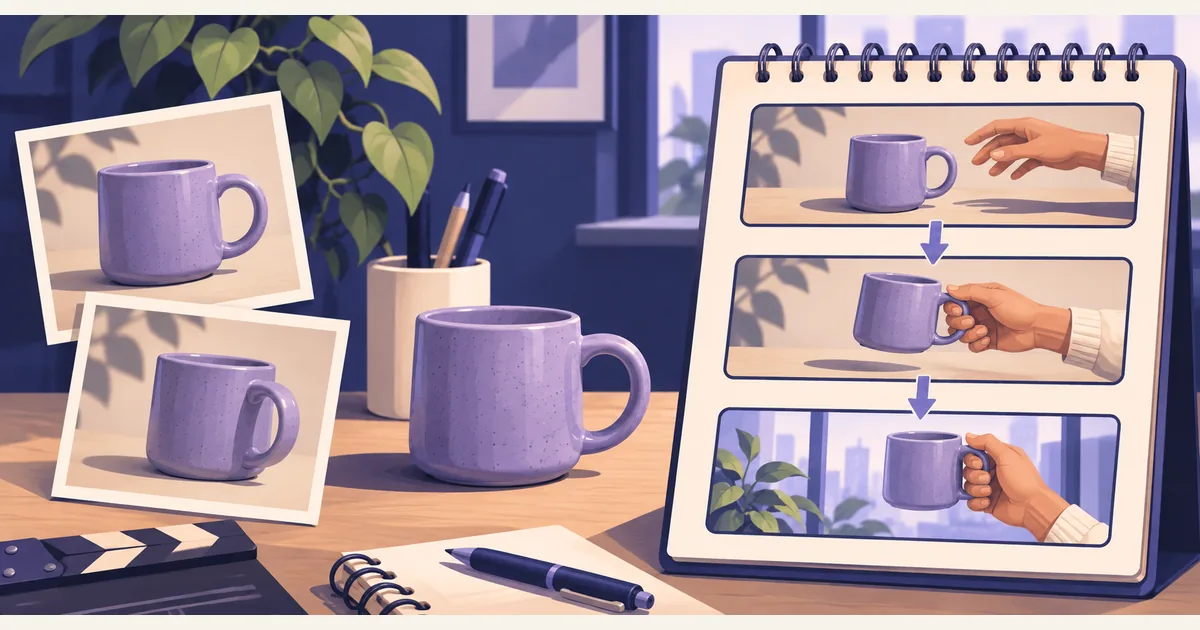
Reference images guide what a video looks like. Keyframes guide what it looks like at particular stages. First and last frames are keyframes for the two endpoints. Choosing the right role matters more than uploading a large collection of images.
For a ceramic-mug promo, a front and side photo can establish the mug’s shape. An image of it resting on a table can establish the opening. A hand lifting it can define a middle moment, and the mug held beside a window can define the ending. Those inputs describe different things, even when they show the same object.
Choose appearance, endpoints or a sequence
| Input | What it controls | Use it when… |
|---|---|---|
| Reference images | Subject, object, setting or style, without a fixed place in time | The same mug or character must remain recognizable across shots. |
| First frame | Opening composition | You want to animate an existing image. |
| First and last frames | Opening and destination | You know where a continuous action should begin and finish. |
| Intermediate keyframes | Ordered visual milestones between the endpoints | The middle contains an action or reveal you need to direct. |
Uploading three product angles as keyframes can accidentally ask for a sequence of changing viewpoints. Uploading three story moments as ordinary references does not, by itself, assign their order. Name each image’s role and describe the movement connecting the moments.
These are generation controls, distinct from keyframes on an editing timeline. They guide a model’s result; they do not make every detail or transition exact.
Can we define precise timestamps for Kling keyframes?
Timing has to be given in the Kling prompt, and it is not precisely respected. There is no separate precise timestamp-placement control for middle frames on Tellers. You can write fractional targets—the official middle-frame example includes them—but that does not make them reliable timing constraints.
In our Tellers Movement Anchoring experiment, Robin tested five sampling patterns, explicit timestamp instructions, @image1 references and labels such as “middle frame 1”. None produced the reliable placement needed for the method. Kling often used the last middle image as the generated ending and added intervening movement. Keyframes remain useful visual guidance; do not plan an exact overlap or timed handoff around them.
Source-frame extraction is separate: Tellers can extract individual frames precisely. The failure was in Kling’s generated timing, not the extraction. Clip-duration and image-count limits still apply.
Found a way to make Kling follow middle-frame timing more precisely? Send a reproducible prompt, settings and result to contact@tellers.ai.
Which Tellers models support each input?
The table covers image controls in our video-generation tools. Numbers are maximum image counts per input; — means no dedicated input for that role. Counts across columns are not automatically additive.
| Model on Tellers | First / last frames | Intermediate keyframes | Reference images |
|---|---|---|---|
| Kling 4.0 | 1 + 1 | Up to 8: 10 keyframes including endpoints | Up to 10 |
| Kling 3.0 | 1 + 1 | — | Up to 7 in reference-only mode; 4 with a reference video |
| Seedance 2.5 | 1 + 1 | — | Up to 30, in a separate mode |
| Seedance 2.0, Fast and Mini | 1 + 1 | — | Up to 9, in a separate mode |
| Gemini Omni 1.2 Flash | 1 + 1 | — | Up to 6; 3 per character for up to 2 characters |
| Pruna P-Video-2-Pro-Reference | 1 + 1 soft keyframes | — | Up to 9 total, including endpoints |
| Pruna P-Video, P-Video-2 and P-Video-2-Pro | 1 + 1 | — | — |
| LTX 2.3 Fast and Pro | 1 + 1 | — | — |
| WAN 2.2 | 1 + 1 | — | — |
| Grok Imagine Video 1.5, HappyHorse 1.0 and Runway Gen-4.5 | First only: 1 | — | — |
| LTX-2 Distilled | — | — | 1 image for style/composition conditioning |
Several distinctions affect how you prepare files:
- Kling: the Kling 4.0 guide distinguishes ten keyframes from ten reference images. Our Kling 4.0 walkthrough demonstrates a three-frame continuous shot. Kling 3.0’s reference limits depend on the mode; on Tellers, its reference-video mode cannot also take first/last frames.
- Seedance: choose first/last frames or image/video/audio references for a request. The API keeps these modes separate; requesting an opening image through the reference-mode prompt does not add a dedicated first-frame input. The 2.5 reference expansion raises the image limit to 30. You can describe story stages using references and a prompt, but Tellers does not expose a separate intermediate-keyframe input for Seedance.
- Omni: reference images can guide recurring subjects. First-to-last-frame interpolation on Tellers is limited to ten seconds.
- Pruna Reference: soft endpoints share the nine-image budget. With both endpoints supplied, seven ordinary reference images remain. “Soft” means guidance, not a promise of an identical endpoint.
- LTX-2 Distilled: its single conditioning image is not a guaranteed unchanged opening frame. Use a model with explicit first/last inputs when those compositions matter.
Give each uploaded image a job
For a shot where the action matters, upload three coherent storyboard images and ask Tellers:
Use Kling 4.0 for one continuous 8-second mug shot.
Use mug_on_table as the first frame, hand_lifting_mug as the
middle keyframe, and mug_by_window as the last frame.
Keep the mug's proportions, handle and lavender glaze consistent.
The hand lifts it slowly; the camera follows with a gentle push-in.
No cuts or text. Add quiet room ambience.
For a new composition where appearance matters more than endpoints:
Use Seedance 2.5. Use mug_front and mug_side as product references,
not first or last frames. Create an 8-second close-up of the mug
on a breakfast table in soft morning light. Keep its shape and
glaze consistent. Slowly move the camera from left to right.
Review the handle, hand contact and geometry throughout the result, not just the opening still. For exact product evidence, use recorded footage. Once a generated shot works, ask Tellers to trim it into your edit and add campaign wording as text in the finished video.
Start a video in Tellers by uploading the images you need and explaining their roles. Two clear endpoints or a few consistent references are a useful starting point; fill the remaining slots only when they solve a specific problem.
Frequently asked questions
Can Seedance 2.5 use a first frame and reference images in the same generation?
Not as combined input types: Seedance 2.5 currently separates first/last-frame mode from reference mode, including on Tellers. You can ask for a reference image to guide the opening in the prompt, but that is not a dedicated first-frame input. If combined inputs become available, we can test Movement Anchoring with Seedance 2.5; precise timing would still need validation.
Can we define precise timestamps for Kling keyframes?
Target times must be given in the Kling prompt; there is no separate precise placement control for middle frames on Tellers. Fractional times can be requested, but Kling did not respect them precisely in our Movement Anchoring tests. It often treated the last middle image as the generated ending and added intervening movement. Precise source-frame extraction does not make generated timing precise.
Are first and last frames also keyframes?
Yes. They are endpoint keyframes: one guides the opening and the other guides the ending. Intermediate keyframes add visual milestones between them. This is different from animation keyframes that control an effect or property on an editing timeline.
Can I use the same image as a reference and a first frame?
The image can serve either role, but choose deliberately. As a first frame it defines the opening composition; as a reference it guides appearance without fixing when it appears. Some models combine these roles, while Seedance uses separate endpoint and reference modes.
Do more reference images always improve an AI video?
No. Add an image when it provides useful information, such as a second view of a product. Conflicting designs, lighting or costumes give the model competing instructions. Start with a small, coherent set.